
Alternative
A Cleo alternative with no bank login
Cleo made being roasted about your spending a thing. To do it, Cleo reads your bank transactions. If you want the roast without handing over your bank login, or you'd rather be stopped before you buy than teased afterwards, here's how the two apps compare.
Quick answer
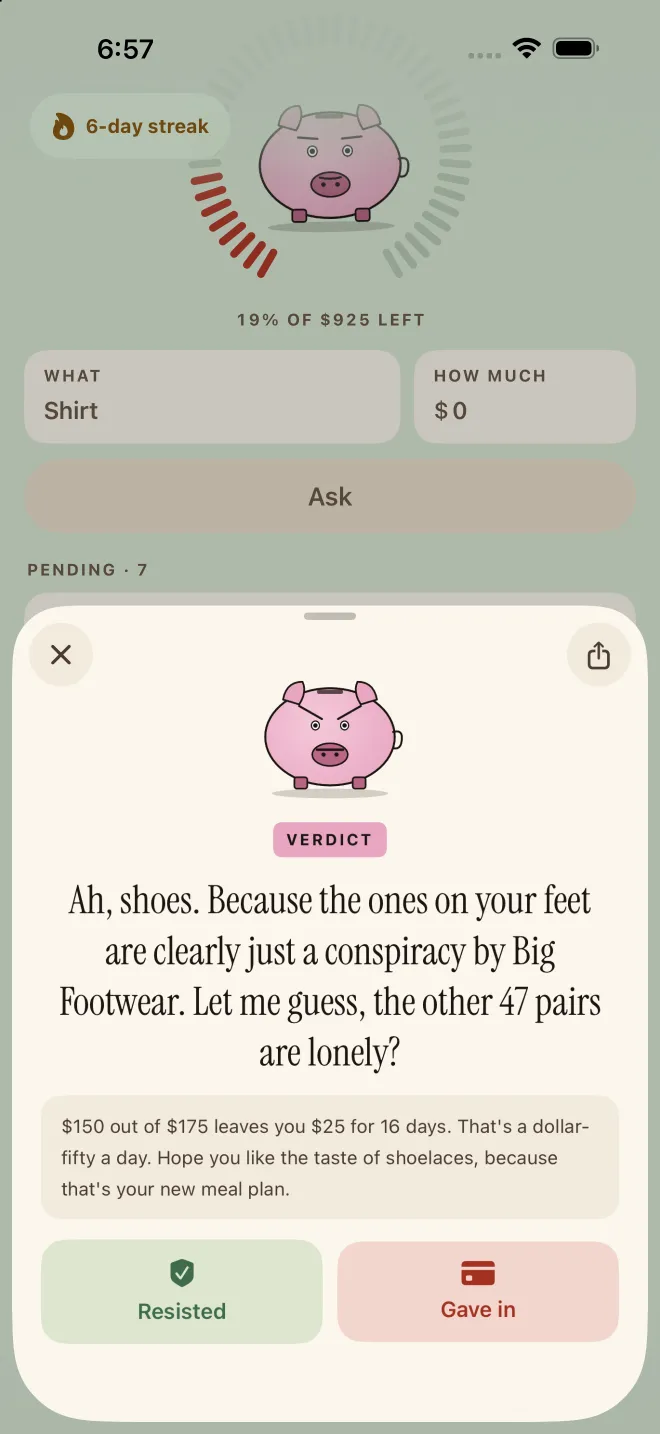
If you like Cleo's roasts but don't want to link your bank, Next Paycheck is the closest alternative. Instead of reading your transactions after you've spent, it works before you buy: you tell Pork what you want and the price, he checks it against the paycheck and bills you entered once, and talks you out of it. The trade-off is real: no automatic spending tracking, no cash advances and no savings account. If those are why you use Cleo, Cleo is still the better app.
We make Next Paycheck, so read this knowing we're biased. Cleo is a big, well-rated app, and below we're specific about what it does better. Facts about Cleo come from its App Store listing and help center.
Why people look for a Cleo alternative
- They don't want to link a bank. Cleo links to your bank through Plaid, and its chat, budgets and roasts are built on that data. Reviewers note you need to connect a bank account before you can use most of the app.
- They want to be stopped, not reviewed. A roast about last month's takeout is funny, but it doesn't get the money back. Pork weighs in while the thing is still in your cart.
- They don't need an advance. Cleo's App Store name is "Cleo AI: Cash Advance & Budget", and its listing promotes advances of up to $250, a savings account and credit building. If all you want is to stop buying things, that's a lot of app.
Cleo vs Next Paycheck at a glance
| Cleo | Next Paycheck | |
|---|---|---|
| What it is | An AI money coach you chat with, plus cash advances, savings and credit building | An AI that judges a purchase before you make it |
| When it roasts you | After you spend: roast mode comments on your spending habits | Before you buy: Pork reviews the thing you're about to buy |
| What it knows about your money | What it reads from your linked bank accounts | The paycheck and bills you type in |
| Bank connection | Yes, through Plaid | No |
| Cash advances | $20 to $250 if eligible ($20 to $100 for first-time users); same-day transfers cost $3.99 to $14.99 | None |
| Other tools | Savings with interest, credit builder, debt plan (paid), a weekly money quiz, voice chat | Safe to spend until payday, a streak, money avoided, follow-up reminders |
| Price | Free; Grow, Plus and Credit Builder subscriptions | Free |
| Privacy label | Contact info and usage data used to track you; financial, credit and contact info linked to you | Analytics and crash data not linked to you; nothing used to track you |
| Rating (US) | 4.7 | 5.0 |
| Works on | iOS 15.6 or later | iPhone and iPad, iOS 26 or later |
Where Cleo is better
- It sees your spending automatically. Because it reads your bank, Cleo can answer "how much did I spend on takeout last month?" without you typing a thing. Next Paycheck only knows what you tell it.
- It does much more with money. Savings with interest, credit building, a debt plan on its paid tier, and a weekly quiz about your own spending.
- Cash advances. If you need $20 to $250 before payday and you're eligible, Cleo offers one. Next Paycheck has nothing like it.
- Scale. Cleo is rated 4.7 on the App Store and says it helps more than 8 million people.
- Older iPhones. It runs on iOS 15.6; Next Paycheck needs iOS 26.
Where Next Paycheck is better
- It works before you buy. You ask about the thing in your cart, and Pork checks it against what's safe to spend until payday before saying no.
- No bank login. You type your paycheck and bills once. There's no account, and your numbers are stored on your device.
- It follows up. 1 to 72 hours after you ask, Pork checks whether you caved.
- Accountability you can see. Resisted or gave in on every ask, a streak of days since you last gave in, and a running total of the money you've avoided.
- Two kinds of roast. Comedian mode does the math and makes fun of you for asking; Savage mode, on NextPaycheck+, skips the numbers.
How to switch from Cleo
- Add your paycheckWeekly, every two weeks or monthly, plus your payday.
- Add your fixed billsRent, phone, subscriptions: pick from presets or name your own. You can skip this and come back.
- Ask before your next purchaseType the thing and the price, and let Pork do the rest.
- Keep Cleo if you need itIf you use Cleo for advances or savings, keep it. The two apps barely overlap.
Who should stay with Cleo
- You use its cash advances.
- You want your spending tracked and budgeted automatically.
- You use its savings account or credit builder.
- You actually enjoy being roasted about last month's spending.
If that's you, Cleo is the better app. If what you want is to stop the next purchase, without linking a bank, try Pork. For more options, see the 3 best apps to stop impulse buying.
Frequently asked questions
Is there an app like Cleo that doesn't need a bank account?
Yes. Next Paycheck gives you an AI that roasts a purchase without connecting to your bank: you enter your paycheck and bills once, then ask before you buy. It won't track your spending automatically, and it has no cash advances, which need a bank connection.
Does Next Paycheck give cash advances like Cleo?
No. Next Paycheck has no cash advances, loans, savings accounts or credit building. If you need an advance, compare the fees and eligibility rules of the apps that offer one before you sign up.
Does Cleo's roast mode need my bank account?
Cleo's roasts are about your spending, which it reads from the bank you link through Plaid. Reviewers note that you need to connect a bank account before you can use most of the app.
Can I use Cleo and Next Paycheck together?
Yes. They do different jobs: some people keep Cleo for budgeting or advances and ask Pork before a purchase.
Sources & further reading
- Cleo AI: Cash Advance & Budget — App Store (US)
- How do I manage my bank accounts in Cleo? — Cleo help center
- Cleo app review — FinanceBuzz, updated August 2025
- Smart Spending - Next Paycheck — App Store (US)
Next Paycheck is a budgeting and spending-accountability tool, not a bank or a financial adviser. This page is general information for educational purposes, not financial, legal or tax advice: your situation is your own, so consider a qualified professional before major money decisions. If debt feels unmanageable, a nonprofit credit counselor can help, and if shopping feels out of control or is causing you distress, it is worth talking to a doctor or mental health professional.