
Best apps
The 3 best apps to stop impulse buying
Impulse buys happen in the few seconds between wanting something and tapping Buy. The apps that help are the ones that get into those seconds. We compared the best of them on how they stop a purchase, what they cost, and how much of your financial life they need to see.
Quick answer
The best apps to stop impulse buying are Next Paycheck, best for talking you out of a purchase in the moment; CartPause, best for waiting it out; and impause, best for understanding why you buy. Next Paycheck and CartPause work without a bank login. impause connects to your bank.
We make Next Paycheck, so we're biased. To keep this useful anyway, each app here is the best at something, we say where the others beat ours, and every fact about the other apps comes from their own App Store listings on the US store. Prices change, so check the listing before you subscribe.
How we picked
We looked for apps built to stop a purchase, not budgeting apps that tell you about it afterwards. For each one we asked:
- When does it step in? Before you buy, during a waiting period, or after the money's gone.
- What does it need from you? A bank login, or a few numbers you type in.
- What does it cost?
- What does its App Store privacy label say? Each developer fills in its own label, and Apple doesn't verify it.
- Is it still being updated?
The three picks at a glance
| Next Paycheck | CartPause | impause | |
|---|---|---|---|
| Best for | Talking you out of it in the moment | Waiting it out | Understanding why you buy |
| How it stops a purchase | You ask Pork; he checks the price against what's safe to spend until payday and roasts it | You share the item and set a 24, 48 or 72-hour timer | You review past purchases; its Pause shows the cost in hours of your life and holds a "Don't Buy" for 24 hours |
| Bank connection | None | None | Yes |
| Price (US) | Free | Free; Pro $1.99 a month, $19.99 a year or $39.99 once | $10 a month or $80 a year |
| Privacy label | Analytics and crash data not linked to you; nothing used to track you | Identifiers and usage data linked to you | Contact info and usage data linked to you |
| Rating (US) | 5.0 | 4.0 | 4.5 |
1. Next Paycheck: best for talking you out of it in the moment
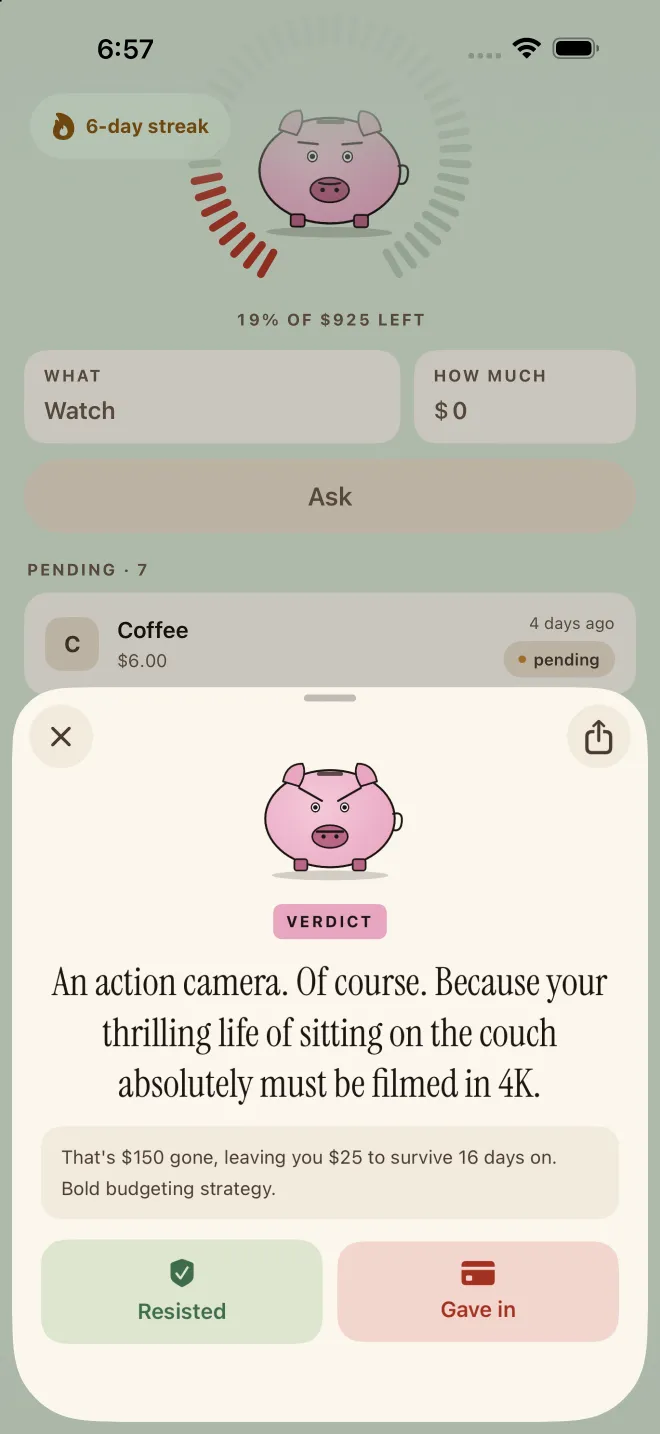
Impulse buys are fast, so Next Paycheck works in the few seconds before you pay. Type what you want and the price, and Pork, the app's AI accountability pig, checks it against what's safe to spend this paycheck after the bills due before payday, then turns it down with a roast. You log whether you resisted or gave in, which feeds a streak and a running total of money avoided, and Pork checks in 1 to 72 hours later to ask whether you caved.
- Price: free.
- Needs: your paycheck (weekly, every two weeks or monthly) and your fixed bills, typed in once. No bank login and no account.
- Privacy: your numbers are stored on your device. Verdicts are written by AI (DeepSeek, with Apple's on-device model as a fallback where available) after you agree to a consent screen.
- Works on: iPhone and iPad with iOS 26 or later, in 27 languages.
Where it shines
- It steps in before you pay, in a store or online.
- It knows your payday. In Comedian mode, Pork spells out what the purchase would leave you with and for how many days.
- The streak, the money-avoided total and the follow-up make giving in feel like losing something.
Where it falls short
- You type your numbers in yourself, so it doesn't track your spending automatically.
- 10 free asks, then a subscription.
- It doesn't block shopping apps; it only works when you ask it.
- It's new, so it has a shorter track record than the other two.
How it works in Next Paycheck
- Set up onceAdd your paycheck, your payday and your fixed bills. It takes about 30 seconds.
- Ask before you buyType the thing and the price. Pork checks it against what's safe to spend until payday.
- Resisted or gave in?Tap one. Resisting grows your streak and your money avoided; giving in comes off what's left.
- Let the follow-up catch youA few hours later, 1 to 72 of your choosing, Pork asks whether you caved.
2. CartPause: best for waiting it out
CartPause turns the waiting rule into a button. When you see something you want, you share it to CartPause from the shopping app or website, it picks up the name, price and photo, and you choose a 24, 48 or 72-hour pause. When the timer ends, you decide whether you still want it. CartPause's bet is that most impulse buys don't survive the wait.
- Price: free, with unlimited pauses, notes and coaching prompts. Pro ($1.99 a month, $19.99 a year or $39.99 once) adds savings and spending insights, a Someday wish list and a widget.
- Needs: nothing to connect.
- Privacy: its label lists identifiers and usage data linked to you.
- Rating: 4.0; needs iOS 18.6 or later.
Where it shines
- The simplest way to wait out an urge, and it works with any store.
- A generous free version and a cheap Pro.
Where it falls short
- It only helps if you remember to share the item before you buy it.
- It doesn't know your paycheck or bills, so it can't tell you whether you can afford it.
Prefer to wait without an app? Here's how the 24-hour rule works, with a free printable wish list.
3. impause: best for understanding why you buy
impause looks backwards to change your next purchase. You connect your bank and swipe through recent purchases, right if it was worth it and left if you regret it, and over time it points out the triggers behind the regrets. It adds 40 two-minute lessons on the tricks retailers use, finds subscriptions you've forgotten about, and has a Pause that shows what a purchase costs in hours of your life and what it would grow to if invested, then holds a "Don't Buy" for 24 hours.
- Price: $10 a month or $80 a year, with cheaper offers also listed.
- Needs: a bank connection.
- Privacy: its label lists contact info and usage data linked to you, and financial info collected but not linked to you.
- Rating: 4.5.
Where it shines
- It learns from what you actually bought, so the patterns are yours.
- The lessons explain the sales tricks you keep falling for.
Where it falls short
- It needs your bank login.
- It's the priciest of the three, and much of it reviews money you've already spent.
Also worth a look
- Stop Impulse Buying | Budget is a no-spend toolkit: a calendar for your no-buy days and streaks, a buy-or-don't-buy checklist, savings goals and a 52-week challenge. Its privacy label says it collects no data at all. Premium is $9.99, or $49.99 a year. Its last update was in November 2025.
- PauseBuy puts a short pause in front of shopping apps such as Amazon, Temu and SHEIN before they open, with a few questions to answer first.
- Cartless is a no-buy tracker: mark the days you didn't buy in a category and watch what each skip is worth add up.
- Cleo is an AI money coach whose roast mode comments on your spending, which it reads from your bank. It's built around cash advances, savings and credit building. See our Cleo alternative page for how it compares.
None of these is a budget. If impulse buys are part of a bigger question about where your money goes, a budgeting app such as YNAB or Goodbudget gives every dollar a job, and you can use one alongside any of the apps above. If one shopping app is the whole problem, iPhone's built-in Screen Time can put a limit on it for free.
Which one should you choose?
- You buy on autopilot and need someone to say no right now: Next Paycheck.
- Waiting a day usually kills the urge: CartPause, though it can't tell you whether you can afford the thing.
- You don't want to link your bank: Next Paycheck works from the paycheck and bills you type in.
- You want to understand your patterns: impause, if you don't mind connecting your bank and paying $10 a month.
- You want to know what a purchase leaves you until payday: Next Paycheck. In Comedian mode, Pork spells it out.
- You're doing a no-spend challenge: Stop Impulse Buying | Budget, though it hasn't been updated since November 2025.
- You tend to sneak back to the cart later: Next Paycheck checks in 1 to 72 hours after you ask.
- One or two shopping apps are the problem: PauseBuy, though it only steps in on the apps you choose to block.
Whatever you pick, the pause is the point. In a 2019 study of online impulse buyers, most said they wanted tools that would slow them down before checkout. An app that makes you stop, even for a few seconds, does that.
Frequently asked questions
What is the best app to stop impulse buying?
It depends on how you impulse buy. Next Paycheck is best for talking yourself out of a purchase in the moment, CartPause is best if waiting 24 to 72 hours works for you, and impause is best if you're happy to connect your bank and review past purchases. For a no-spend calendar instead, look at Stop Impulse Buying | Budget.
Do I need to connect my bank to stop impulse buying?
No. Next Paycheck and CartPause work without a bank connection: you enter your numbers or share the item yourself. Bank-linked apps such as impause and Cleo can see your real spending, which helps with reviewing the past, but it means sharing your transactions.
Is there a free app to stop impulse buying?
CartPause's core feature, unlimited timed pauses, is free. Next Paycheck is free for your first 10 asks. Stop Impulse Buying | Budget is free to download, with a Premium upgrade. And iPhone's built-in Screen Time can put limits on shopping apps at no cost.
Can an app block shopping apps?
Yes. PauseBuy adds a pause before shopping apps such as Amazon, Temu or SHEIN open, and iPhone's Screen Time can set limits on them. Next Paycheck doesn't block anything; it works when you ask it about a purchase.
Sources & further reading
- Smart Spending - Next Paycheck — App Store (US)
- CartPause: Stop Impulse Buys — App Store (US)
- impause: Stop Impulse Spending — App Store (US)
- Stop Impulse Buying | Budget — App Store (US)
- PauseBuy: Stop Impulse Buying — App Store (US)
- Cartless - No-Buy Tracker — App Store (US)
- Impulse buying: design practices and consumer needs (Moser, Schoenebeck & Resnick) — ACM CHI Conference, 2019
Next Paycheck is a budgeting and spending-accountability tool, not a bank or a financial adviser. This page is general information for educational purposes, not financial, legal or tax advice: your situation is your own, so consider a qualified professional before major money decisions. If debt feels unmanageable, a nonprofit credit counselor can help, and if shopping feels out of control or is causing you distress, it is worth talking to a doctor or mental health professional.